
Buckets of Banners Review: Banner Exchange, Club BoB, Viral Advertising & More
A closer look at a banner exchange that offers several ways to earn advertising impressions—and how to put it to work inside a larger automated traffic strategy.
👋 What Makes This Banner Exchange Different?
Buckets of Banners, commonly called BoB, is a banner advertising network with a somewhat unusual approach to banner exchanges.
At first glance, it looks like a conventional banner exchange: members display banners and earn banner impressions that can be used to advertise their own banners. But BoB adds several additional ways to earn impressions, including surfing the banner area and promoting an Interactive Splash Page (ISP).
That makes Buckets of Banners more than just a place to rotate a banner. For marketers who use banner advertising as part of a larger traffic strategy, this combination is worth investigating.
📌 Buckets of Banners at a Glance
Banner exchange and viral advertising
Up to 5 banners
Up to 30 banners
ISP promotion, surfing, and website banner code
$10 per month, according to the supplied member-area information
$265.50 one-time payment, as displayed in the supplied member-area information
Membership prices, program statistics, and promotional offers can change. Check the current terms before making a purchase.
🪣 What Is Buckets of Banners?
Buckets of Banners is a banner exchange and viral advertising platform. Members add banners to the system, promote those banners, and earn impressions that can be used to display their own advertising.
Unlike a basic banner exchange, BoB gives members several different ways to generate those impressions. The current public website lists three primary methods:
1. Promote Your ISP
Promote your Interactive Splash Page and earn banner impressions based on your membership level.
2. Surf the Banner Area
View banner pages inside the system to generate additional advertising impressions.
3. Display Banner Code
Place BoB banner code on your own website to earn impressions through your site’s banner displays.
The standard and Club BoB membership levels receive different impression rates for each activity. You don’t necessarily need to own a high-traffic website to participate, because you can also generate impressions through activity inside the system itself.
📊 Current BoB Statistics
These are program-reported figures from the supplied public website information, not independently audited statistics. They can change over time.
The size of the network matters because a banner exchange becomes more useful as more members participate and more banners are displayed. However, total banner views should not automatically be interpreted as clicks, visitors, leads, or sales.
🧩 The Interactive Splash Page
The Interactive Splash Page, or ISP, is one of the features that makes Buckets of Banners particularly different.
Instead of simply displaying a banner, the ISP provides a page where members’ banners can be presented together with interactive elements. The current BoB website lists the ISP as one of the three ways members can earn banner impressions.
Standard BoB
Impression per ISP display
Club BoB
Impressions per ISP display
Your ISP therefore isn’t merely a landing page. It is also part of the credit-generation system.
Club BoB adds an Interactive Splash Page “Click” Bonus. According to the current Club BoB information in the supplied member-area details, when a new member clicks one of a Club BoB member’s banners on the ISP before joining, that visitor can receive a signup bonus of up to 500 banner impressions.
💡 Why the ISP Matters
The page itself becomes part of the promotional process. For Club BoB members, the higher impression rate and the additional click-related incentive give this feature a more prominent role in the overall system.
🔄 How BoB Members Earn Banner Impressions
1️⃣ Promote Your Interactive Splash Page
According to the current public site, members earn different amounts for each display of their ISP.
- Standard BoB members: 1 impression per ISP display.
- Club BoB members: 3 impressions per ISP display.
For Club BoB members, promoting the ISP produces three impressions per display, making it one of the more attractive earning methods listed by the program.
2️⃣ Surf the Banner Area
BoB also allows members to surf through banners and earn impressions through activity within the platform.
- Standard BoB members: 2 impressions per banner-page surf.
- Club BoB members: 4 impressions per banner-page surf.
This means you’re not entirely dependent on finding outside websites willing to install your banner code. You can generate impressions through activity within BoB itself.
3️⃣ Display BoB Banner Code
The third method is displaying BoB’s banner code on your own website.
- Standard BoB members: 0.5 impression per banner display.
- Club BoB members: 1 impression per banner display.
For people who own websites and are willing to place banner code on them, this provides another way to earn advertising inventory. At the Club level, the stated rate is one impression per banner display.
🏆 Club BoB vs. Standard Membership
Club BoB is the upgraded membership level. The supplied member-area comparison shows differences in banner rotation, earning rates, referral benefits, and additional promotional features.
👤 Standard BoB
A starting point for members who want to test the system, rotate a smaller selection of banners, and earn impressions through the available activities.
🚀 Club BoB
An upgraded option with higher earning rates for key activities, up to 30 banners, a broader referral-credit structure, and additional promotional benefits.
| Feature | Standard BoB | Club BoB |
|---|---|---|
| Banners you can rotate | 5 | 30 |
| Level 1 referral commission | 10% | 50% |
| Level 1 referral credit earnings | 10% | 20% |
| Level 2 credit earnings | 0% | 10% |
| Level 3 credit earnings | 0% | 5% |
| Level 4 credit earnings | 0% | 3% |
| Level 5 credit earnings | 0% | 2% |
| Level 6 credit earnings | 0% | 1% |
| Banner-code display rate | 0.5 | 1 |
| Surf-area earnings | 2 | 4 |
| ISP earnings | 1 | 3 |
| Banner URLs shown in surf area | No | Yes |
| ISP “Click Me” incentive | No | Yes |
| Priority ISP branding | No | Yes |
| Viral Signup Multi-Rewards | No | Yes |
| Club BoB Clique Lounge | No | Yes |
| Monthly bonus credits | 0 | 20,000* |
| Random referrals | No | Yes |
| Potential benefit from BoB advertising | No | Yes |
*The 20,000 monthly bonus credits shown in the supplied member-area comparison apply to the monthly subscription. Rates and benefits are based on the supplied member-area information and may change.
🤝 The Referral Credit Structure
The referral system is another major difference between Standard BoB and Club BoB. Standard members receive credit earnings from Level 1 referrals, while the Club BoB structure extends through six levels.
Credit earnings
Credit earnings
Credit earnings
Credit earnings
Credit earnings
Credit earnings
In addition, the direct referral commission increases from 10% for Standard BoB members to 50% for Club BoB members, according to the supplied member-area comparison.
Referral percentages describe the program’s stated structure. They don’t guarantee referrals, purchases, or earnings. The credit-earning percentages and direct referral commission are separate benefits.
🖼️ Up to 30 Banners to Rotate
Another practical advantage of Club BoB is the increased number of banner slots. Standard members can rotate up to five banners, while Club BoB members can rotate up to 30 banners.
Standard banner slots
Club BoB banner slots
That is a substantial difference for someone promoting multiple programs. Instead of choosing only a handful of offers, you can maintain a larger advertising rotation for traffic sources, affiliate programs, lead-generation pages, and other marketing properties.
✨ Other Club BoB Benefits
🔗 Banner URLs in the Surf Area
Club BoB members can have their banner URLs shown in the surf area. This adds another way their advertising can be presented to other members.
👥 Random Referrals
Club BoB includes random referrals as a membership benefit. These can provide additional exposure, although a referral is not automatically an active member or buyer.
📣 Owner-Funded Advertising
The Club BoB information says members can benefit when the program owner purchases advertising and includes Club BoB members’ banners in that promotion.
🎨 Priority ISP Branding
The member-area comparison lists priority ISP branding and additional ISP-related promotional opportunities among the Club BoB benefits.
🎁 Viral Signup Multi-Rewards
This is another Club-only feature listed in the member-area comparison. Review the current account terms to understand how it operates.
💬 Club BoB Clique Lounge
Club BoB also lists access to its Clique Lounge as an additional membership feature.
The supplied BoB information identifies Brad Webb as the person behind State-Of-The-Art-Mailer and says that Brad Webb is employed by BoB. The Club BoB information also describes a benefit connected with advertising purchased by the program owner. The lifetime offer includes advertising on State-Of-The-Art-Mailer as well.
🏆 Club BoB Lifetime Membership
Club BoB Lifetime Membership
One-time payment shown in the supplied member-area offer
The offer displays a reduced price of $265.50 from a listed $295 price and states that lifetime membership includes Club BoB benefits for life.
This is significantly different from paying a monthly subscription. For someone who intends to use BoB for years, the lifetime option changes the economics of the upgrade considerably. However, whether lifetime makes sense depends on how heavily you intend to use the system and whether you expect to remain active with banner advertising over the long term.
🎁 Lifetime Bonus #1: 1,000,000 Banner Impressions
The supplied lifetime offer includes a bonus of 1,000,000 BoB banner impressions, presented by the program as a $99 value. According to the offer, those impressions are added to the account immediately.
For an active banner advertiser, a million additional impressions can provide a substantial amount of advertising inventory. Remember, though, that impressions are exposure rather than guaranteed clicks or visitors.
🎁 Lifetime Bonus #2: SOTAM Viral Banner Advertising
The second bonus is a 30-day viral banner advertisement at State-Of-The-Art-Mailer.com. According to the supplied offer information, the buyer chooses a banner that rotates throughout the SOTAM network for 30 days, with no stated limit on the number of banner impressions received.
The offer assigns this bonus a stated value of $79.95. It potentially adds an advertising opportunity outside the Buckets of Banners network itself.
The exact availability and terms of these bonuses should be confirmed before purchasing the lifetime option.
Compare the one-time cost with the monthly option, estimate how much you will realistically use the system, and verify the current offer and included bonuses in your account. A lifetime upgrade is only worthwhile if the benefits justify the expense for your situation.
🧠 How We Use Buckets of Banners
🚀 Our Strategy: Let EZEngine Handle the Banner Setup
Buckets of Banners is one of the portfolio programs we use as part of the broader EZEngine traffic strategy. Rather than treating it as a separate banner exchange that we have to configure from scratch, EZEngine provides a set of specific instructions and banner links that connect the program to our traffic pages.
The goal is to get your banners promoting several of your EZEngine pages, including traffic, cashflow, and launch pages. Those pages are designed to give visitors more than a simple splash screen: they contain information and opportunities to explore EZEngine and its portfolio programs.
Once the links are installed correctly, the supplied rotator can handle banner selection and rotation. This is where the program becomes especially useful as part of a larger automated marketing setup.
🌐 Why the EZEngine Traffic Pages Matter
Brad explains that the EZEngine traffic pages are the backbone of the overall system. They cover different traffic systems and strategies and contain actionable information intended to engage visitors.
These pages also display a combination of banner exchange codes and text-ad widgets. According to the EZEngine setup instructions, each page view can generate credits in multiple exchanges.
Visitors can explore the information, join EZEngine, join one or more portfolio programs, or take another action. Some may do nothing, but the system is designed so that page views can still contribute to the credit-generation process.
The broader strategy is to use the credits generated throughout the network to support additional advertising and bring more visitors to the pages. Results depend on actual activity and participation; traffic, signups, and commissions are not guaranteed.
🛠️ Step 1: Create Your Buckets of Banners Account
- Register a new Buckets of Banners account.
- Confirm your email address.
- Log in to your account.
- Ignore the login upgrade offers for now and head directly to the Member’s Area.
Brad recommends creating a new account for this setup. Once you’re in the Member’s Area, the first thing we need is your numerical User ID Number.
🔑 Step 2: Find Your Numerical User ID Number
⚠️ Important: Use Your User ID NUMBER—not your Username!
- Look for Promo Tools in the left-hand menu.
- Open Promo Tools.
- Find the first form field and copy your numerical User ID Number.
- Enter that number into the EZEngine setup form and click Update.
Brad specifically warns that the second link shown below the first one uses your username. That is not the information we need. Your account will have a username, but EZEngine needs the numerical User ID Number assigned to your account.
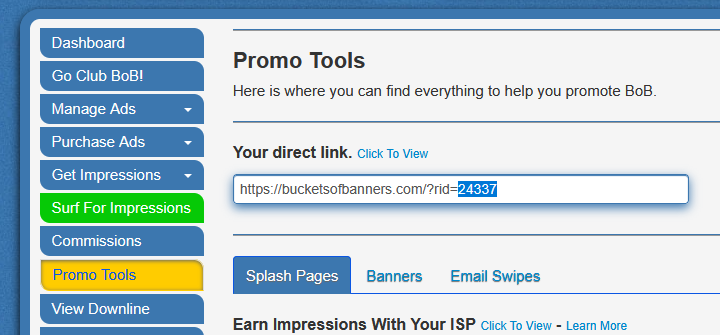
Use the first form field containing your numerical User ID Number—not the username-based link below it.
Username: The name you select when registering.
User ID Number: The numerical identifier assigned to your account. This is what you must enter into the EZEngine form. Using the wrong one can prevent your personalized pages from working correctly.
🖼️ Step 3: Add the Five EZEngine Banners
Now that your account is registered and your numerical User ID has been entered into the EZEngine setup form, it’s time to add the banners.
In your Buckets of Banners Member’s Area, click Manage Ads in the left-hand menu. You can add standard 468 × 60 pixel banners and smaller 125 × 125 pixel buttons.
EZEngine provides five specific banner configurations. These are designed to send visitors to different pages in your personal EZEngine system.
1️⃣ 468 × 60 Banner — Traffic Page Rotator
Banner image:
https://banners.ezadz.net/b/eze2a.jpg
Website destination:
2️⃣ 468 × 60 Banner — Cashflow Page Rotator
Banner image:
https://banners.ezadz.net/b/eze4.jpg
Website destination:
3️⃣ 125 × 125 Button — Banner Page Rotator
Banner image:
https://banners.ezadz.net/b/eze1b.jpg
Website destination:
4️⃣ 468 × 60 Banner — Premium Launch Set
Banner image:
https://banners.ezadz.net/b/eze6a.jpg
Website destination:
5️⃣ 125 × 125 Button — Premium Launch Set
Banner image:
https://banners.ezadz.net/b/eze6b.jpg
Website destination:
⚠️ IMPORTANT: Personalize Every EZEngine Destination Link!
You’ll notice that each of the destination URLs above contains the membername danwatson. That’s my membername, so you must replace that part with your own EZEngine membername.
For example, if your EZEngine membername is yourname, this:
https://ezrl.net/danwatson/traffic
Would become:
https://ezrl.net/yourname/traffic
Only replace the danwatson portion. Keep the rest of the URL exactly as shown, including the final page name such as traffic, cashflow, banners, or launch.
Do this for all five destination links before saving your banners. This is how you make sure the banners send visitors to your own EZEngine pages rather than mine.
🔄 Step 4: Understand the Automatic Banner Rotator
One of the useful parts of this setup is that the banners use selections from the supplied rotator with your personal referral links.
Brad explains that the rotator allows the team to monitor how the different banners are performing. Banners that aren’t getting clicks can be removed, and new banners can be added as they become available.
That means you don’t have to keep replacing individual banner images yourself. Once you’ve added the correct image and destination links exactly as instructed, the rotator can handle the ongoing banner selection process.
💡 Why the Exact Links Matter
The automatic setup depends on using the supplied banner images and destination links correctly. Make sure your numerical User ID has been entered and that every destination URL has your own EZEngine membername in place of danwatson. A small setup mistake can send visitors to the wrong page or prevent your personalized traffic pages from working as intended.
💳 Step 5: Assign Credits to Your Five Banners
After adding the five banners, there’s one more important step: assigning advertising credits.
The banners need credits assigned before they will begin displaying. You may not have any credits available when you’re first setting up Buckets of Banners, and that’s perfectly normal within the EZEngine setup sequence.
If You Already Have Credits:
- Check your credit balance in the Buckets of Banners dashboard.
- Click Manage Ads in the left-hand menu.
- Choose Assign Credits.
- Spread your available credits across all five banners.
If You Don’t Have Credits Yet:
Don’t worry about it. Continue working through the remaining EZEngine portfolio program setups. As your pages and other parts of the system begin generating credits, come back to Buckets of Banners, check your dashboard statistics, and assign credits to the five banners when you have some available.
Account settings and quotas can vary. If your account doesn’t give you the option to add everything listed in the instructions, start at the top and add as much as your account allows.
🌐 Optional: Put the Banner Exchange Code on Your Own Website
Brad also suggests grabbing your Buckets of Banners exchange code if you own a website or blog.
Copy the banner exchange code and save it in your own notes or Scrapbook file. You can then add it to your website when you’re ready.
Displaying the code can generate additional credits through your website’s banner displays. It also helps promote the banner exchange outside the EZEngine network, potentially bringing more people into the program.
It’s an optional step, but it’s worth considering if you have a website where the banner code makes sense.
✅ Your Buckets of Banners Setup Checklist
- Create a new account and confirm your email.
- Log in and open the Member’s Area.
- Go to Promo Tools and copy your numerical User ID Number.
- Enter that number into the EZEngine setup form—not your username.
- Open Manage Ads.
- Add all five supplied banner configurations, as account limits allow.
- Replace danwatson in every destination URL with your own EZEngine membername.
- Check your dashboard for available credits.
- Use Manage Ads → Assign Credits when you have credits available.
- Optionally save your banner exchange code for use on your own website.
That’s the Buckets of Banners setup. Once the account details and five banner links are entered correctly, the rotator can manage the banner selection process while the larger EZEngine system works on generating activity and credits across its traffic pages and portfolio programs.
Want Buckets of Banners to Be More Hands-Free?
This is where the EZEngine strategy really comes into play. Instead of manually managing every banner and trying to coordinate multiple traffic programs on your own, EZEngine gives you a structured way to connect Buckets of Banners with your personal traffic pages and the rest of your portfolio.
Once you complete the initial setup correctly—including entering your numerical User ID, personalizing the five destination links, and assigning credits when they’re available—the supplied banner rotator can handle the ongoing banner selection process.
Your banners then promote your EZEngine traffic, cashflow, and launch pages. Those pages are designed to combine information, banner exchanges, and text-ad widgets so that page activity can contribute to the wider credit-generation strategy.
The idea is to get the pieces working together so you’re not constantly managing every individual part by hand.
🚀 SEE HOW EZENGINE AUTOMATES YOUR TRAFFIC STRATEGY
Learn how the six engines and individual portfolio programs can work together as one larger system.
🧠 Why Club BoB Is Strategically Interesting
The Club BoB upgrade isn’t simply about getting more banner impressions. It changes the earning rates and adds more options in several areas simultaneously.
- 2X the surf-area impression rate.
- 3X the ISP impression rate.
- 2X the banner-code exchange rate.
- Up to six levels of referral credit earnings.
- Higher direct referral commissions.
- Up to 30 rotating banners.
- Additional ISP exposure and promotional opportunities.
- Random referrals.
- Potential exposure from advertising purchased by BoB.
For an occasional banner advertiser, the Standard account may be sufficient to test the platform. For someone building a serious banner rotation, the upgraded level offers more capacity and additional features to evaluate.
📈 Banner Advertising vs. Actual Traffic
1. Impressions
Your banner is displayed to a visitor. This creates exposure but doesn’t mean anyone clicked.
2. Clicks
Someone notices the banner and chooses to visit the destination you are promoting.
3. Results
The visitor takes a useful action, such as joining your email list or exploring an offer.
The purpose of banner advertising is to create repeated exposure and generate clicks from people who find the offer interesting. That’s why I would evaluate BoB based on both sides of the equation:
- How efficiently can you generate impressions?
- How well do those impressions produce actual visitors?
- What do those visitors do after reaching your destination?
Impressions have the most practical value when they help create relevant visitors who take the next step. Track clicks, opt-ins, and other outcomes rather than judging a traffic source by impression totals alone.
⚖️ Advantages and Things to Consider
✅ Potential Advantages
- Three different ways to earn banner impressions.
- An ISP that doubles as part of the earning system.
- Banner-area surfing can generate impressions without your own website.
- Club BoB supports up to 30 rotating banners.
- Higher impression rates at the Club level.
- A six-level referral-credit structure for Club BoB members.
- Additional promotional features and stated lifetime bonuses.
- Potential to incorporate the system into a broader advertising strategy.
- EZEngine provides a defined setup process for connecting five banners to its traffic pages.
- The supplied rotator can manage banner selection and replace underperforming banner creatives.
⚠️ Things to Consider
- Banner impressions do not guarantee clicks, leads, or sales.
- Program-reported statistics are not independently audited here.
- Referral benefits depend on actual network activity.
- Club BoB costs should be weighed against realistic usage.
- Lifetime pricing and bonuses may change.
- Traffic quality and conversion rates need to be measured.
- Banner creative and landing-page quality still matter.
- The numerical User ID must be entered correctly during EZEngine setup.
- All supplied destination links must be personalized with your own EZEngine membername.
- Credits must be assigned before the banners can display.
🤔 Is Buckets of Banners Worth Trying?
I think Buckets of Banners is worth testing, particularly for marketers who already use banner advertising as part of their traffic strategy.
The current network size and reported banner-view volume are substantial, and the system provides several different ways to earn advertising inventory. Club BoB is particularly interesting because it changes the earning ratios while adding referral and promotional benefits.
However, I wouldn’t recommend joining simply because the program reports millions of banner views. The stronger reason to consider BoB is that its mechanics may fit a strategy where banner impressions are continuously generated and recycled into advertising.
🧪 My Suggested Approach
- Review the current membership options and terms.
- Start by understanding the basic impression-earning methods.
- Follow the EZEngine setup instructions carefully if you’re using its five-banner strategy.
- Test relevant banners and destinations.
- Track clicks and conversions, not just impressions.
- Consider an upgrade only if the extra features justify the cost for your strategy.
❓ Frequently Asked Questions
What is Buckets of Banners?
Buckets of Banners is a banner exchange and viral advertising network that allows members to earn banner impressions through several different forms of activity.
How many banners can I rotate?
Standard members can rotate up to five banners. Club BoB members can rotate up to 30.
How do I earn banner impressions?
You can earn impressions by promoting your Interactive Splash Page, surfing the banner area, or displaying BoB banner code on your own website.
What is an Interactive Splash Page?
The Interactive Splash Page is a promotional page where members’ banners can be displayed. It is also one of the ways members earn banner impressions.
What does Club BoB cost?
The supplied member-area information shows a $10 monthly Club BoB subscription and a lifetime offer priced at $265.50 as a one-time payment. Confirm current prices before purchasing.
Is Club BoB lifetime?
The supplied lifetime offer states that Club BoB benefits are included for life. Review the terms displayed at the time of purchase.
How many impressions does Club BoB earn from surfing?
The supplied BoB information lists four banner impressions per banner-area page surf for Club BoB members.
How many impressions does Club BoB earn from the ISP?
Club BoB members earn three banner impressions each time their Interactive Splash Page is displayed, according to the supplied information.
Does Club BoB have referral commissions?
Yes. The supplied member-area information lists a 50% direct referral commission for Club BoB members. Referral commissions depend on qualifying referral activity and the current program terms.
Does BoB have a referral-credit system?
Yes. Club BoB members can earn banner impressions from referral activity through six levels, according to the supplied member-area comparison.
What information does EZEngine need from my BoB account?
EZEngine needs your numerical User ID Number from the first form field under Promo Tools. Do not enter your username or use the username-based link.
Why do I need to replace danwatson in the banner destination links?
The supplied examples contain the review author’s EZEngine membername. Replace danwatson with your own EZEngine membername in each destination URL so visitors are sent to your personal traffic pages.
What if I don’t have credits when I finish setting up the banners?
That’s okay. Continue setting up the other EZEngine portfolio programs and return to Buckets of Banners later. Check your dashboard statistics and assign credits to the five banners when credits become available.
Does EZEngine automate the banner setup?
EZEngine provides the setup instructions and personalized banner links for its traffic pages. Once you create your account, enter the correct numerical User ID, personalize the destination URLs, and add the banners as instructed, the supplied rotator can manage banner selections and updates. You still need to complete the initial setup and assign credits when available.
🏁 Final Verdict
Buckets of Banners is not your ordinary banner exchange, and that description is accurate. The combination of banner exchange, surf-based impression generation, Interactive Splash Pages, referral credits, random referrals, and owner-funded advertising creates a system that is considerably more involved than simply placing a banner on a website.
The Club BoB upgrade is where the system becomes particularly interesting. The difference between earning two versus four impressions from surfing, one versus three impressions from the Interactive Splash Page, and 0.5 versus one from banner-code displays gives upgraded members more ways to generate advertising inventory.
Add the ability to rotate 30 banners, six levels of referral-credit earnings, 50% direct referral commissions, random referrals, Club-only ISP features, and potential exposure from BoB’s own advertising, and Club BoB becomes much more than a simple banner-exchange upgrade.
For our overall strategy, I would classify Buckets of Banners as a banner-credit generator and traffic-recycling tool. The real value isn’t simply seeing your banner displayed. It’s the ability to generate impressions and use them to create more exposure for the programs, pages, and offers in a larger traffic system.
The best approach is to test the system, measure the results, and make upgrade decisions based on actual usage rather than headline impression numbers alone. When combined with the EZEngine setup, the five-banner configuration gives you a structured way to promote several of your traffic pages without having to continually manage each banner creative yourself.
Get Our Traffic Promo Codes
Want to save money when joining and upgrading traffic exchanges, safelist mailers, banner networks, and other advertising programs?
We regularly collect promotional offers and promo codes from the traffic sources we cover.
Join our email list to receive traffic promo codes and other advertising opportunities as they become available.
