
If you’ve been exploring ways to expand your online reach or make connections in affiliate marketing, you’ve probably come across the term “safelist mailer.” While it may sound a little old-school, safelist mailers have a pretty interesting history and have grown up a lot over the years. I’ve watched these platforms change from simple email-sharing lists to much more advanced systems. Here’s a closer look at how safelist mailers started, how they’ve changed over time, and why they’re still worth knowing about.
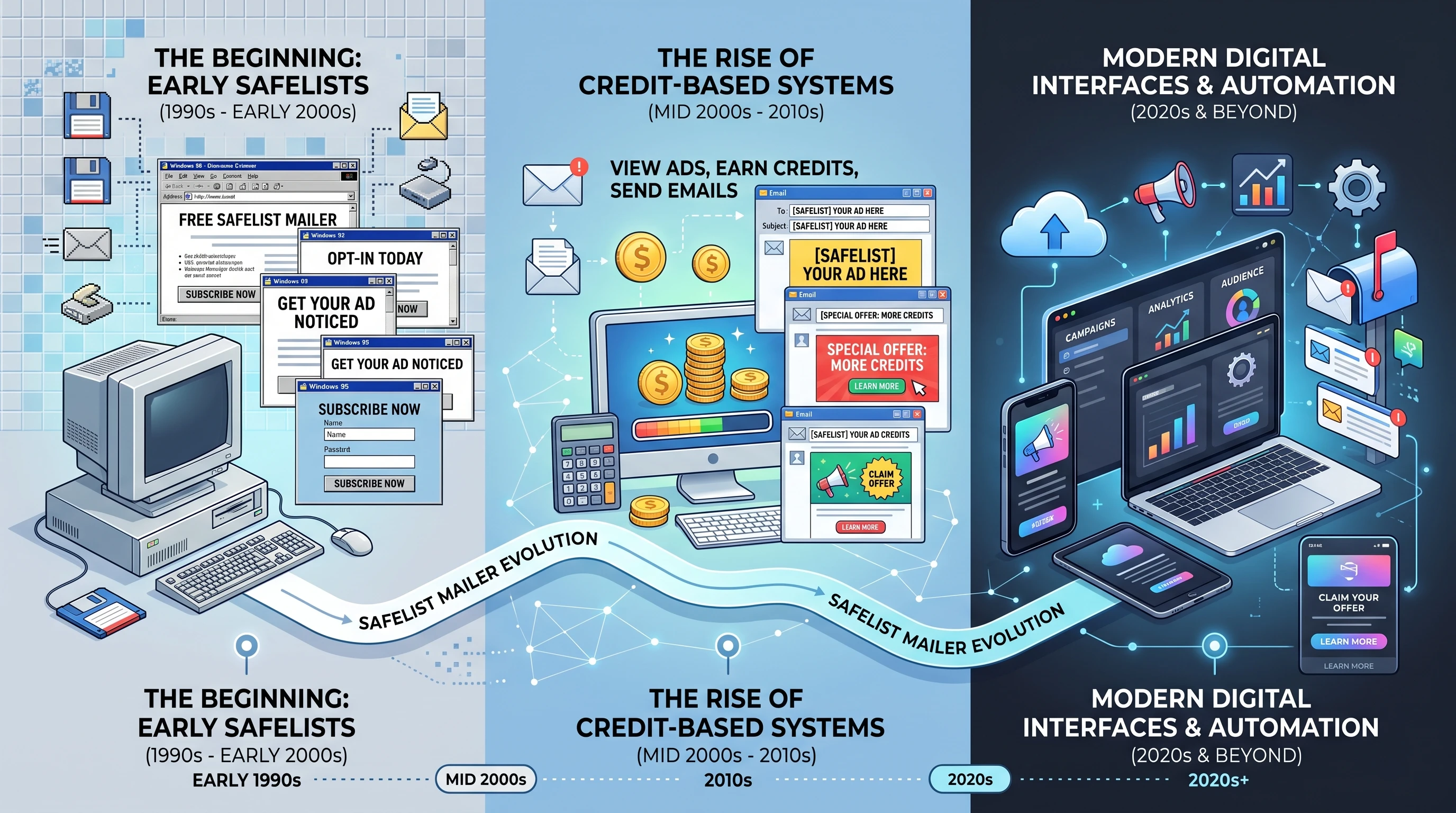
The Origins of Safelist Mailers
Back in the late 1990s and early 2000s, the internet was still pretty new for a lot of people, and online marketing was just finding its footing. Email was a main way to reach out to people, especially for anyone excited about growing their home business or getting into affiliate marketing. That’s where safelist mailers came in.
At the very start, a safelist was a simple list where people agreed to receive promotional emails from other members. The agreement was mutual; if you wanted to send messages, you had to join and agree to receive messages, too. No fancy tech, just a shared goal: get eyes on your offers without breaking email rules or spamming random people.
This setup quickly became popular. Safelists gave solo entrepreneurs and marketers a space to promote offers safely, mostly free from the risk of getting blacklisted or banned by oldschool ISPs. It was a win-win for people willing to trade inbox space for a chance to advertise their own stuff.
How Safelist Mailers Changed Over Time
Over the next few years, safelist mailers developed a lot. What started out as basic group emails soon became organized into platforms with their own rules, features, and rewards systems. This move from those early, basic setups was driven by a need for more functionality and to fit the growing expectations of marketers.
One of the major updates was the introduction of credit based systems. Instead of having to open every single email, you could read emails, click links, and earn credits. These credits allowed you to send your own promotions out to other members. This made people more likely to actually look at the emails they received and encouraged engagement, not just mass mailing.
As email filters and regulations such as CAN-SPAM became stricter, safelist mailers also stepped up their compliance game. These platforms started using confirmed optin methods to keep things aboveboard, plus automated tracking to handle bounces, unsubscribes, and complaints. The move from manual email lists to automated platforms made these tools a lot more manageable and appealing for both new and experienced marketers.
Today, many safelist mailers offer features like HTML email support, tracking for opens and clicks, VIP upgrades, ad banners, and integration with other online ad networks. Some even come with built-in games, contests, and traffic exchanges for members who like a bit of fun with their promoting.
How Safelist Mailers Work
These mailers revolve around the “give and take” model. Here’s what’s going on behind the scenes:
- Membership: You sign up and usually verify your account with an email confirmation link. Many platforms offer free and paid membership options.
- Receiving Emails: Once inside, you agree to get emails from other members. Most of these messages promote business opportunities, lead capture pages, or affiliate products.
- Earning Credits: Reading and clicking on links inside those emails earns you credits. Sometimes, reading admin or featured ads gives you bonus credits.
- Sending Your Own Messages: You use the credits to send your marketing emails to other members. Paid members usually get wider reach, more sending allowances, or extra perks like priority listings.
This structure makes sure lists are always full of engaged members. If nobody reads the emails, they won’t earn credits and can’t send their own. It keeps the cycle moving.
Advantages and Challenges of Safelist Mailers
- Easy to Access: Signing up is simple, making it beginner friendly. No tech expertise required; just an email and a willingness to participate.
- Built-in Audience: You’re hitting inboxes of people who expect (and usually want) business, marketing, or affiliate offers.
- Great for Testing: Safelists let you check out subject lines, landing pages, or offers with lots of real users, pretty quickly. It’s much less pricey than paid solo ads or big email list rentals.
- Time Commitment: If you’re on free plans, earning credits requires real time. You’ll need to open and click through plenty of emails to get your ads out there.
- Mixed Quality Traffic: Some members are just after credits. That means not every click or open comes from someone genuinely interested in your offer.
- Email Volume: Joining several safelists at once means your inbox fills up fast. Using a dedicated email address is a smart move.
Main Types of Safelist Mailers
After using a bunch of these platforms, I’ve seen a few main types stand out:
- Traditional Safelists: The old school version where every member gets every mail. These are a bit less common now thanks to inbox overload.
- CreditBased Safelists: The most popular type. You get to control how many emails you want to read (and send), and you get rewarded for engaging with content.
- Viral Mailers: These add in referral bonuses and sometimes gamified elements, like contests or leader boards. They’re designed to spark friendly competition and more activity.
Things to Keep in Mind Before Using Safelist Mailers
- Read the Rules: Each safelist has its own limits on links, HTML, and types of offers. Following the rules helps you avoid getting banned and keeps your credits safe.
- Quality Over Quantity: Crafting a catchy subject line, a short message, and a clear call to action can make your email stand out in very crowded inboxes.
- Choose the Right Offers: Safelists work better for business opportunities, digital courses, and affiliate products tailored to marketing minded users. Direct E-commerce or mass appeal offers usually don’t perform as well.
- Dedicate an Email Address: Using a dedicated inbox avoids your main email getting swamped and keeps things organized.
Staying In Compliance
Email marketing laws like CAN-SPAM in the US and GDPR in Europe impact how safelist mailers can operate. Most reputable safelists automatically carry optout links and make it super simple to unsubscribe, but reading the privacy policy and terms is always smart.
Using Safelists with Modern Tools
Safelist mailers aren’t on the cutting edge of digital advertising, but they still have a place; especially for beginners, people building a personal brand, or anyone who likes affordable exposure. You can even use them alongside social media, paid ads, and content marketing for an extra boost of traffic.
- Split Testing: Try different ads and see which one gets the most clicks or conversions.
- Traffic Funnels: Safelists send people to your squeeze pages for low cost. Offer a freebie or lead magnet to capture emails for your own list.
- Link Tracking: Many safelist mailers now offer built-in tracking so you can see which subject lines or offers get the most attention among a marketing audience.
Frequently Asked Questions about Safelist Mailers
Question: Are safelist mailers still worth using?
Answer: They can be useful for testing offers, building a list, or getting exposure if you don’t have a big budget. They’re not as targeted as solo ads, but they do send real traffic.
Question: How do I keep my inbox from getting overwhelmed?
Answer: Set up a free Gmail or Outlook address just for safelist activity. Use mail filters to keep promo emails organized, so it doesn’t affect your main inbox.
Question: Can safelist mailers help me grow my main email list?
Answer: They can! If your squeeze page or lead magnet is interesting to marketerminded people, you can gain subscribers and test your landing page at the same time.
Question: Is it safe to use my real name and info?
Answer: Stick to using your business name, or a pen name if you prefer privacy. Most platforms protect your info, but a bit of caution goes a long way.
Safelist Mailers in Today’s Digital Landscape
I’ve found that safelist mailers can still play a role in a wide online strategy. While they aren’t a replacement for quality SEO, engaging social content, or paid social ads, they’re another avenue to try, especially for anyone just getting started. Their community aspect, fun features, and low barrier to entry make them worth at least experimenting with.
If you’re interested in learning more or want to compare popular safelist mailers, checking out review sites such as Affilorama or forums like Warrior Forum is pretty handy. Careful research helps you sort out the better, more active sites from those that don’t deliver.
Safelist mailers are one of those things that seem simple, but there’s more going on under the surface. Whether you’re marketing a side hustle or testing out new traffic sources on a budget, these platforms offer a “retrocool” way to get your offers out there. If you try it and put some thought into your campaigns, you might just be surprised by what you can achieve. I have built a very large portion of my email list from safelist mailers and have got many many sales from this audience as well. It’s all in exactly how you do it. But regardless of however you make safelist mailers work for YOU, I have a way to make them even better for you. I am going to give you a substantial amount of additional credits, banners, texts, solos and more to these websites and traffic sources. All you have to do is click the banner down below to get added to my promo code email list and you will get large batches of extremely generous promo codes for a different traffic source every single day including a LOT of the safelist mailers that you are already using and a few you probably aren’t! This is one of the easiest and fastest ways (not to mention FREE ways) to get exponentially more eyeballs on your offers than you are currently getting. So what are you waiting for? You have nothing to lose and thousands of dollars worth of FREE extra web traffic to gain! So click the banner now and get started with your first batch of free traffic promo codes!

