
EZBanEx Review: Viral Banner Advertising, Referral Rewards & EZEngine Automation
Discover how this banner exchange works, how its referral system can reward activity through six levels, and how EZEngine can automate much of the setup and ongoing work.
And here’s where it gets especially interesting: When you connect EZBanEx to EZEngine, much of the initial banner submission process can be handled through an automated import wizard. That means you don’t have to manually build every banner entry from scratch.
📋 EZBanEx at a Glance
Viral Banner Exchange
A platform designed to help members promote banners and earn advertising credits.
1,000 Signup Credits
The basic account includes 1,000 credits upon registration, according to the current EZEngine setup instructions.
Six Referral Levels
Bonus credits can be earned based on the activity of referrals and their referrals, down through six levels.
EZEngine Integration
An import wizard can load your recommended banners directly into your EZBanEx account.
Multiple Banner Sizes
Different banner formats give members several ways to participate in the exchange.
Additional Growth Options
Members can publish banner codes on their own websites or promote direct banner links on other traffic sites.
💡 What Is EZBanEx?
EZBanEx is EzSitez’ own viral banner exchange. The basic concept is straightforward: members submit banners, earn credits, and use those credits to have their advertising displayed through the exchange.
Banner exchanges can be useful because they give online marketers another way to put their websites, offers, and referral pages in front of other people who are already participating in online advertising.
But EZBanEx has another feature worth paying attention to: its referral reward structure.
🌳 A Six-Level Referral Structure
EZBanEx rewards members directly for referrals and provides bonus credits based on the activity of referrals throughout six levels.
In other words, the activity of people you refer may contribute to your credit earnings, and activity further down your referral organization can also matter.
This creates an incentive to build a referral organization rather than relying exclusively on your own banner activity.
Important: Referral credits depend on actual referral activity. They should not be viewed as guaranteed traffic, earnings, or a guaranteed amount of advertising credits.
🎯 How the Banner Exchange Fits Together
The basic strategy is to use your available banner slots to promote different destinations. As your banners receive activity and your referral network develops, you can build up credits to use for additional advertising.
Submit Your Banners
Receive Impressions
Earn Credits
Promote More
The more ways you have to introduce people to your referral links, the more opportunities you have to build a referral organization. Your own website or blog can help with this, but it isn’t the only way to promote your banners.
⚙️ The EZEngine Advantage: Automating Your EZBanEx Setup
🔥 This Is the Part I Like Most
One of the biggest advantages of using EZBanEx as part of the EZEngine system is that you don’t have to manually create all the recommended banner entries yourself.
EZEngine has a dedicated EZBanEx setup process. Once you enter your correct member ID number, its import wizard can check your details and load the recommended banners directly into your account.
The goal is to eliminate repetitive setup work and make this program much easier to maintain as part of your larger traffic system.
How the EZEngine Integration Works
First, create your EZBanEx account, confirm your registration, and log in.
On the Members Dashboard, locate your referral link. Your EZBanEx Member ID is the final four digits at the end of that link.
Copy only those four digits. Do not copy the entire referral link.
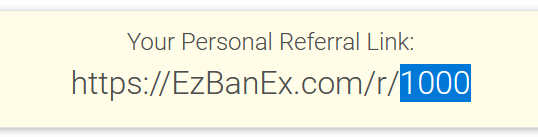
Illustration supplied in the EZEngine setup instructions.
Enter the four-digit EZBanEx ID into the EZBanEx configuration field in your EZEngine account and save it.
EZEngine specifically needs the numerical Member ID from the end of your EZBanEx referral link. Entering the wrong information can cause the import process to return an error.
Once your Member ID is saved, use the EZEngine import wizard:
⚙️ Import Your Banners into EZBanEx
EZEngine will take you to a page where it can check your account details and load the recommended banners directly into your EZBanEx account.
This is a major time-saver. Instead of manually entering every recommended banner and destination, the wizard handles the import process for you.
The import process requires three available banner slots.
The basic account includes three slots. If you’ve already added banners and have fewer than three available, you’ll need to remove some banners, purchase additional slots as a one-time add-on, or consider another account.
EZBanEx provides 1,000 credits just for signing up. EZEngine also adds credits to the imported banners as part of its setup process.
Once your banners are in place, check your account and make sure any available credits have been assigned.
You don’t have to use every credit immediately. Brad’s instructions recommend leaving the signup credits available for now if your system is just getting started. As EZEngine begins generating additional credits automatically, you can return and assign them to your banners later.
Make sure all three banners are displaying correctly, test the destination links, confirm your credits are assigned where appropriate, and save your EZBanEx login information.
Once those checks are complete, the main EZEngine integration work for this program is finished.
✅ What EZEngine Does for You
- Provides a dedicated EZBanEx configuration area.
- Uses your saved Member ID to identify your account.
- Checks your account details through its import process.
- Imports the recommended banners directly into EZBanEx.
- Adds credits to the imported banners as part of the setup process.
- Allows you to leave the initial signup credits available and return to assign them later.
What you still need to do: Register, retrieve and save your Member ID, ensure three slots are available, run the import wizard, check your banners and links, and manage credits when needed.
🌐 How to Earn Additional Banner Credits Outside EZBanEx
One of the more interesting parts of the EZBanEx strategy is that you’re not limited to earning credits only through activity inside the exchange.
EZBanEx provides unique banner exchange codes that you can publish on your own website or blog. You can also use direct banner links on other traffic sites if you don’t own a website.
If You Own a Website or Blog
Visit Earn Banner Credits from your EZBanEx dashboard. Retrieve your unique banner codes, making sure you select the versions that include your referral link.
Then place those codes on pages or blog posts you own.
If You Don’t Own a Website
Use the Banner Linking option to find instructions and copy the direct linking URLs.
Save those links in your scrapbook and submit them to traffic sites where you have banner advertising slots.
📐 A Tip About Banner Sizes
The EZEngine instructions explain that non-standard banner sizes earn more credits. If you’re publishing banner exchange codes on your own website, consider mixing the available sizes rather than using only one format.
Check the current credit values for the individual sizes inside your EZBanEx account before deciding how to distribute them.
🌳 Why Outside Referrals Matter
EZEngine makes it easy to connect EZBanEx to your existing system, but Brad also recommends looking beyond your own EZEngine network when building referrals.
Here’s why: EZBanEx rewards activity through six levels. If everyone in your referral organization is already part of EZEngine, you’re still participating in that network. However, bringing in people who operate their own websites and blogs can introduce additional opportunities for banner-code publishing and referral activity.
🎯 The Bigger Referral Strategy
You
Your Referrals
Their Referrals
Potential Bonus Credits
The six-level reward structure gives you a reason to introduce the program to people who can actively use banner advertising, including people who have their own websites and blogs.
Remember, credits depend on actual activity and the program’s reward rules. A larger referral organization does not automatically mean a particular amount of credits.
💰 Additional Banner Slots and Upgrade Options
The basic EZBanEx account includes three banner slots. If you eventually want to promote more banners, EZBanEx offers optional packages that can provide additional slots and bulk credits through a one-time payment.
The platform also has upgrade options. According to the EZEngine instructions, two of the upgrade options are currently one-time payments that provide lifetime benefits.
| Option | What to Know |
|---|---|
| Basic Account | Includes three banner slots and 1,000 signup credits. |
| Additional Slot Packages | Optional one-time purchases for more banner slots and bulk credits. |
| Upgrade Options | Additional options are available, including two described in the setup instructions as one-time lifetime-benefit purchases. |
⚙️ How EZBanEx Fits Into the Larger EZEngine System
EZBanEx is one piece of a much larger traffic-building approach. The idea behind EZEngine is to connect multiple programs and traffic resources so that the setup work you complete in each program contributes to a coordinated system.
Rather than treating every traffic program as a completely separate project, EZEngine provides a central place to configure your accounts and connect the relevant promotional pages and links.
🔄 The Connected Traffic Strategy
Configure Programs
Connect Your Links
Promote Traffic Pages
Build Activity
As more programs are connected, the system can help reduce repetitive work and give your promotional strategy more moving parts working together.
EZBanEx contributes a banner exchange, credit-earning opportunities, and a referral structure. EZEngine’s import wizard makes the initial setup much easier, while your own websites and other traffic sources can provide additional ways to promote your banner links.
🤖 How Much of EZBanEx Can Be Automated?
It’s worth being clear about what automation actually means here. EZEngine can handle a substantial part of the recommended account configuration, but it doesn’t eliminate every task associated with operating an advertising account.
| Task | How It’s Handled |
|---|---|
| Registering an account | Manual – you create your EZBanEx account. |
| Finding your Member ID | Manual – copy the final four digits from your referral link. |
| Saving your Member ID | Manual – enter it into EZEngine. |
| Importing recommended banners | Automated through the EZEngine wizard. |
| Initial banner credit allocation | EZEngine adds credits to the imported banners as part of setup; you should verify the results. |
| Using signup credits | Manual – return to EZBanEx and assign them when you’re ready. |
| Publishing banner codes on your website | Manual – optional additional activity. |
| Submitting direct links to other traffic sites | Manual – optional additional promotion. |
| Checking banners and links | Manual – test your setup and check your account periodically. |
🏆 The Bottom Line on Automation
Once you’ve registered, saved your Member ID, and made sure your three banner slots are available, EZEngine can take care of the recommended banner import process with a single wizard.
That removes much of the repetitive setup work. You still control your account, credits, optional outside promotion, and any upgrades you decide to purchase.
For a program that is part of a larger traffic-building system, that’s a useful amount of automation.
❓ EZBanEx Frequently Asked Questions
The basic account includes three banner slots. EZEngine’s import process requires all three slots to be available.
The current EZEngine setup instructions state that new members receive 1,000 credits for signing up.
Find your referral link on the Members Dashboard. Your Member ID is the final four digits at the end of that link. Copy only those digits into EZEngine.
No. Once your Member ID is saved and you have three available slots, EZEngine provides an import wizard that can load the recommended banners directly into your EZBanEx account.
Yes. You can use the Banner Linking option to obtain direct banner links and submit them to traffic sites where you have banner slots. Owning a website or blog gives you another option through the unique banner exchange codes.
The referral reward structure extends through six levels. Bonus credits are based on activity within your referral organization.
Not to complete the recommended EZEngine setup. The basic account has three slots, which is exactly what the import wizard requires. Extra slots are optional.
No. You still need to register, retrieve and save your Member ID, run the import wizard, and check your account. EZEngine automates the recommended banner import process and reduces the amount of manual setup required. Optional website publishing, outside promotion, and credit management remain your responsibility.
🏁 My Final Verdict
EZBanEx offers a straightforward way to participate in banner advertising, earn credits, and build a referral organization that can reward activity through six levels.
The basic account gives you three banner slots and 1,000 signup credits. You can also expand your participation by publishing banner exchange codes on your own website or using direct banner links on other traffic sites.
But the feature that makes EZBanEx particularly interesting in this setup is its connection to EZEngine.
Instead of manually entering all the recommended banners, you save your Member ID and let the EZEngine import wizard handle that part of the process. That makes it much easier to add EZBanEx to your overall traffic portfolio without creating another lengthy setup project.
⭐ My Take
If you’re already building a traffic system with EZEngine, EZBanEx is worth considering as another banner exchange to connect to that system.
Start with the basic account, complete the import, verify your banners, and then decide whether you want to expand your advertising activity with outside banner placements or additional account options.
The combination of banner advertising, six-level referral rewards, and EZEngine’s setup automation makes this an interesting addition to a coordinated traffic strategy.
🚀 Visit EZBanEx and Get Started
⚙️ Want to See the Bigger EZEngine Picture?
Build a More Automated Traffic System
EZBanEx is just one of the programs that can be connected to EZEngine. The larger system is designed to help bring multiple traffic programs together, automate portions of their setup, and make it easier to manage your overall promotional strategy.
🎁 Looking for Traffic Exchange and Safelist Promo Codes?
Visit our promo-code resource page for available offers and promotional codes for a variety of traffic programs.
